
League night
Between Games & the Night Recap
The review and captain approval after each game, settling a game that ends level, the Night Recap when the match is done, and locking the week at the end of the night.
Review, then the next lineup#
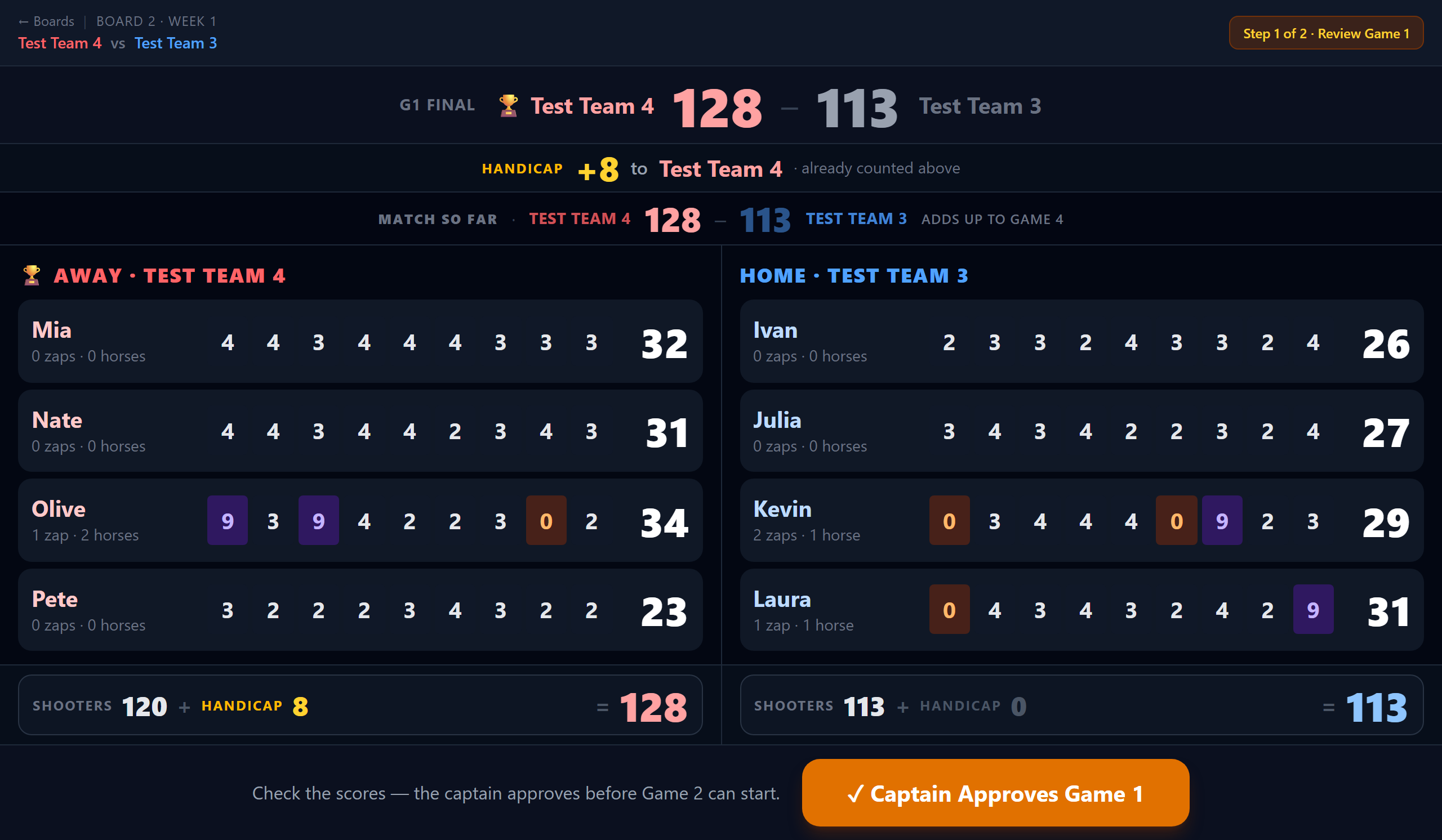 Open full size ↗
When a game finishes, the board walks through two steps, each with the whole screen to itself.
- 1Review. The final score, and every shooter's nine innings and game total, both teams side by side with nothing to tap open or scroll.
- 2Next game's lineup. Reorder shooters, flip who leads off, mark a ghost or bring in a sub, with each shooter's current average shown large. ← Game N results goes back to the review.
It stays on the review until the captain taps ✓ Captain Approves Game N, and the next game only begins on Start Game N+1 — two separate taps, so a stray touch can't skip the review. The approval is saved: backing out, reloading or reopening the match brings you back to this screen until the next game has started.
Match so far#
Under the handicap line is MATCH SO FAR: each game's final and the running total for both teams. Between games it says adds up to game 4; after game 3 it says who game 4 went to.
Tip
Game 4 is games 1 to 3 added together, so it is a quarter of the night's wins and this is the number it turns on. It stays on screen while the next lineup is set, which is when the captain is making decisions on it.
A game that ends level#
If a game is level after nine innings, the review says so and will not let it be approved until somebody says who took it. The approve button reads Who took the tenth? until one of the two team names is tapped.
- 1Both teams shoot the tenth, the same as at the board.
- 2Tap the team that won it.
- 3Approve the game as normal.
Good to know
The tenth decides the game and nothing else. It is not entered as a score, so it does not touch anybody's total, their average, or the zap money — a zap in the tenth is not a quarter in the cup. The two finals stay level on the scoresheet; what changes is who gets the win.
Good to know
Game 4 is still the nine-inning totals added up. A tenth-inning win does not move it.
Tip
Tapped the wrong team? Tap the other one. Nothing is settled until the game is approved.
The Night Recap#
Once game 4 is worked out, the board shows the Night Recap: the result, all four games side by side, and a box score of every shooter's total per game plus their night total.
Good to know
Beside the four game scores is Board N zaps · should be — the zaps thrown on that board tonight and what they come to at the league's rate. Add the boards together and check that against the cash counted out of the cup. The two are not meant to match exactly: not everybody remembers their quarter, and the gap is the point of having both numbers.
- 1✏️ Edit Scores drops back into the game tabs for a correction — the recap comes back when you are done.
- 2Back to Boards when you have finished reviewing.
Closing out the night#
When every board is finished, the boards screen offers 🔒 Lock Week N at the top. It asks once, then marks the week done — no need to go back to the league and find the Weeks tab.
Good to know
Locking is bookkeeping, not a gate: it does not stop a board mid-match, and Unlock sits right beside it. See Weeks & Locking for what it does change.