
Money & printing
Season Payout
The end-of-season payout: what came in, what comes off the top, how the pot splits between the top four teams, and the sheet you hand round with the cash.
What the Payout tab is for#
 Open full size ↗
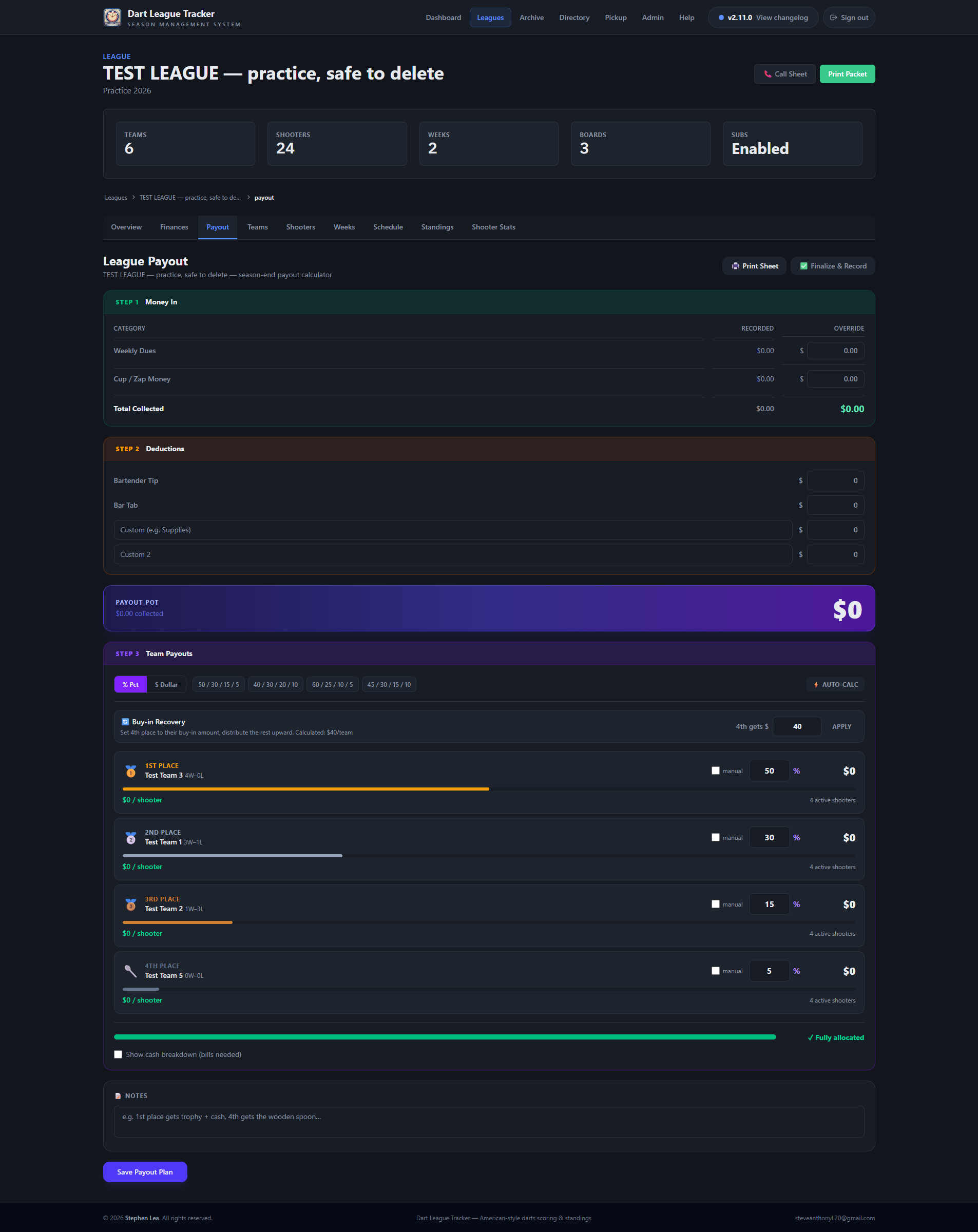
At the end of a season there is money from dues and money in the cup, and it has to be split between the teams that finished on top. The Payout tab does that arithmetic in the open, shows its working, and prints a sheet you can carry round with the cash.
It reads the standings for who finished where, and the Finances tab for what was collected. It writes nothing back.
Good to know
Admins only. Scorekeepers and viewers never see it.
Step 1 — Money in#
 Open full size ↗
- Recorded is every week entered on the Finances tab, added up. It cannot be edited here.
- Override is for when the cash on the table does not agree. Type what you counted and that is what gets used. The ✕ puts Recorded back.
- Total Collected is dues and cup added together.
Good to know
The Finances tab's third column deliberately does not come into this.
Step 2 — Deductions, and the pot#
What comes off the top before anybody is paid: Bartender Tip, Bar Tab, and two spare rows you name yourself — trophies, shirts, a plaque.
Payout Pot = Total Collected − every deduction
Good to know
The pot is rounded down to a whole dollar and never goes below zero, so nobody is owed loose change.
Step 3 — Team payouts#
 Open full size ↗
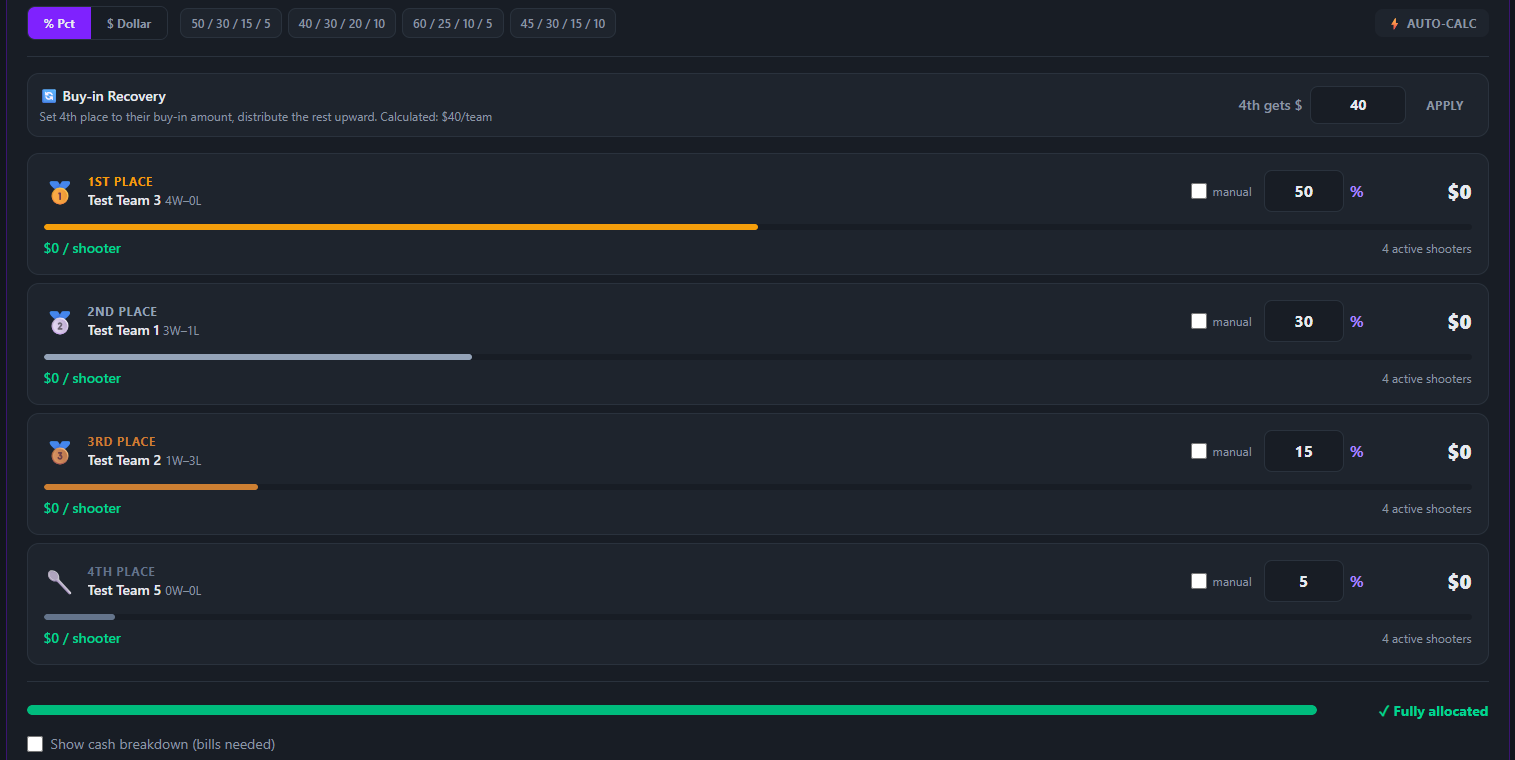
Four places, read off the standings. Each shows the team and its record, the share, the dollar amount, and what that comes to per shooter — divided by the team's active roster, subs left out.
| Control | What it does |
|---|---|
| % Pct / $ Dollar | Type percentages, or dollars. In dollar mode, changing one place spreads the rest across the other three in proportion. |
| Presets | 50/30/15/5, 40/30/20/10, 60/25/10/5, 45/30/15/10. |
| ⚡ Auto-Calc | Rounds 2nd, 3rd and 4th down until each per-shooter share is a multiple of $5, then gives 1st what is left. |
| 🔄 Buy-in Recovery | Gives 4th their buy-in back, then splits the rest roughly 55/28/17. The buy-in is suggested as weekly dues × weeks × shooters per team, capped at a fifth of the pot. |
| manual | Overrides one place's amount outright — “and 4th gets fifty”. |
The bar along the bottom turns green and says Fully allocated at exactly 100%; otherwise it says how much is left or how far over you are.
Good to know
The bar watches the percentages, not manual amounts. With a manual amount set it can read Fully allocated while the four figures add up to something else — check them against the pot before you pay.
Tip
Show cash breakdown (bills needed) turns each amount into notes — 3×$20 + 1×$5 — so you pull the right bills once. Save Payout Plan keeps it all for next time you open the tab.
Printing it, and recording what was paid#
🖨 Print Sheet opens a single page for the night: what came in, each deduction, the pot, and a row per place with the team, the total, the per-shooter figure, the bills needed — and a signature line.
✅ Finalize & Record saves a snapshot into Payout History at the bottom of the page. Give it a label, or it names itself after the league and the date.
Good to know
A snapshot is a record of what was paid. Editing the plan afterwards does not change it, so take it when the money goes out.
What it does not do#
- It does not move money or mark anybody as paid.
- It pays four places. Five, or winner-takes-all, is done by hand.
- It knows nothing about trophies or shirts unless you enter them as a deduction.
Good to know
Two teams level on wins are separated by point differential, then by points scored — the order the standings are already in, so the four places here are the top four rows and the packet marks the same four. If your league settles a paying-place tie some other way, decide that before the money is split.