
League night
Live Scoring on a Tablet
Getting a tablet to the boards, scoring each inning, who is up and on deck, the two team totals, and what the connection light and the signed-out sheet mean.
Getting the tablet ready#
The bar's boards are scored on Amazon Kindle Fire tablets, in the Silk browser. Any tablet with Chrome works the same way.
- 1Sign in with the tablet's scorekeeper login. It stays signed in.
- 2Open the browser menu and choose Add to Home Screen if it is offered. The app then opens full screen from its own icon, starting at the dashboard.
- 3For the boards in one step, go to the app's address followed by /score and bookmark it. It needs no league picked: it goes straight to the boards of whichever league is being played.
Good to know
The Lenovo tablets have a large layout — bigger text and buttons. It is switched on per tablet under Settings → This device. Leave the Kindles on Standard.
Getting to your board#
 Open full size ↗
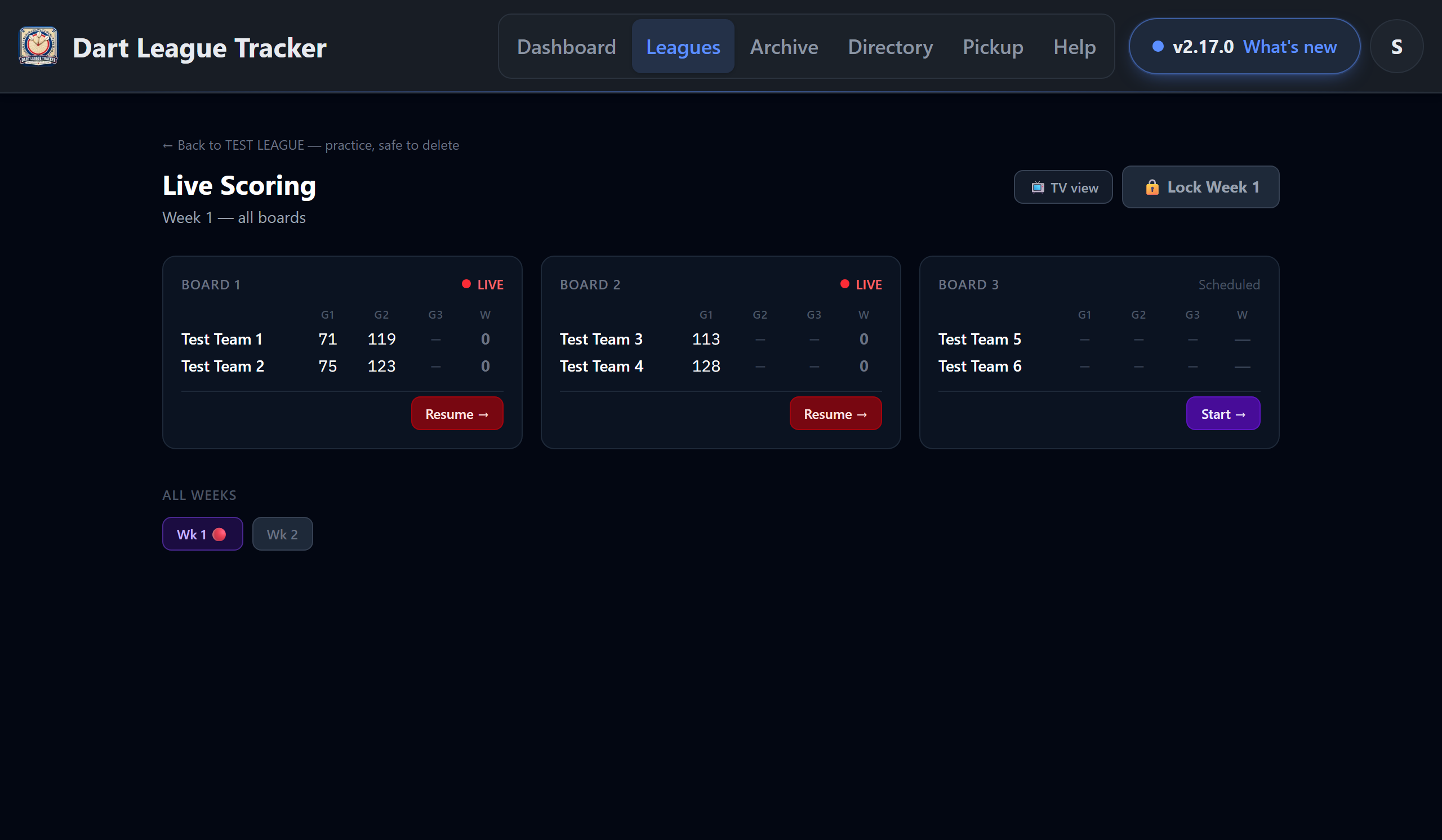
- 1Open the league and tap 🎯 Live Scoring at the top (or go to /score).
- 2The boards screen opens on the week being played, with every board on it. Tap Start → on yours.
- 3A board already being scored shows a pulsing LIVE and Resume →; a finished one shows Complete ✓ and View →.
Tip
Need a different week? The All Weeks row at the bottom of the boards screen switches to it. The Weeks tab still has a 📱 Live Scoring button on each unlocked week as well.
Good to know
Only scorekeepers and admins can reach the boards. Viewers don't get the button.
Entering innings#
 Open full size ↗
 Open full size ↗
 Open full size ↗
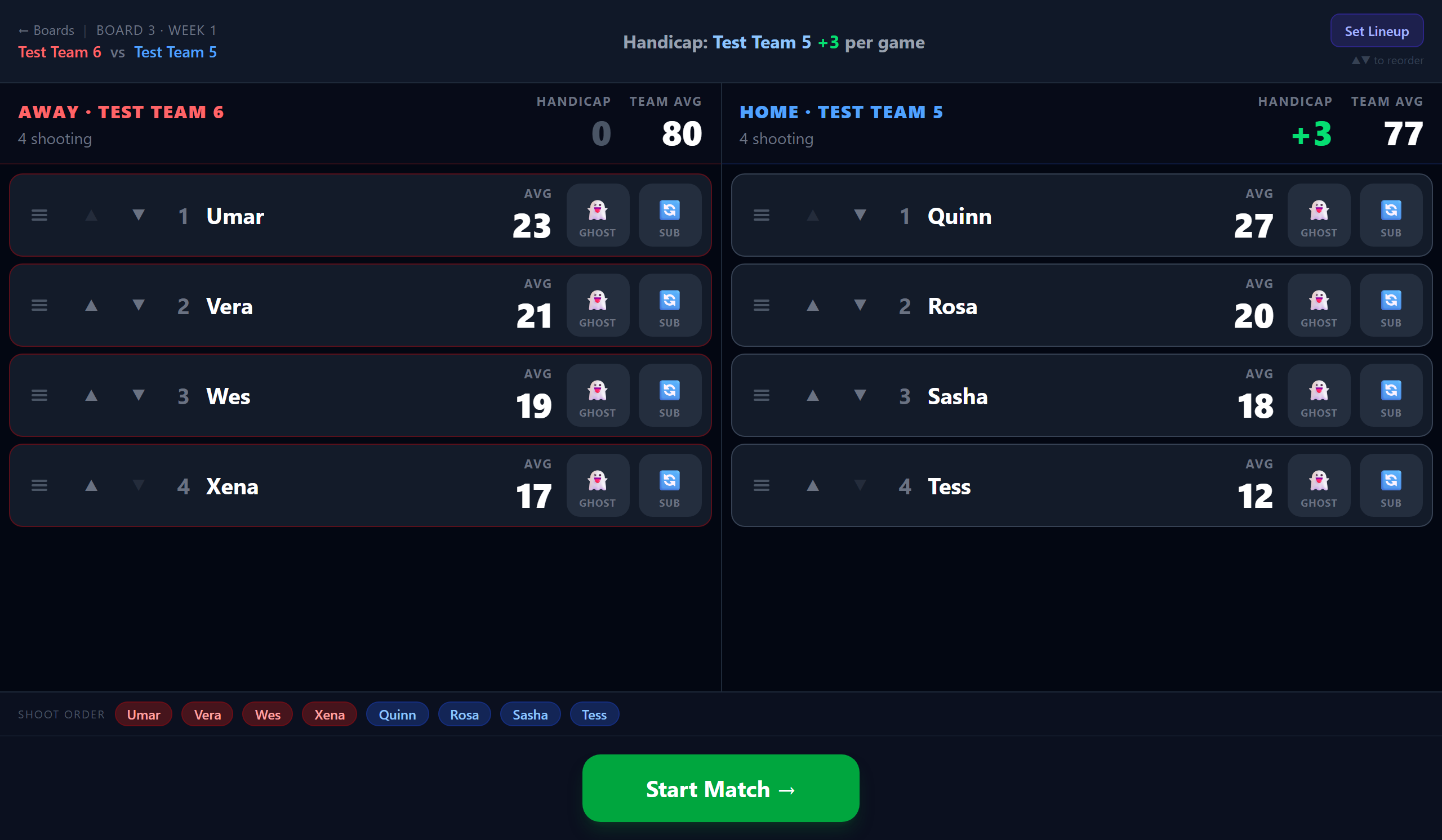
- 1Before the first game, the Set Lineup screen shows each shooter's current average, each team's average, and the handicap (who gets it and how many per game) — so the order can be set with the numbers in view.
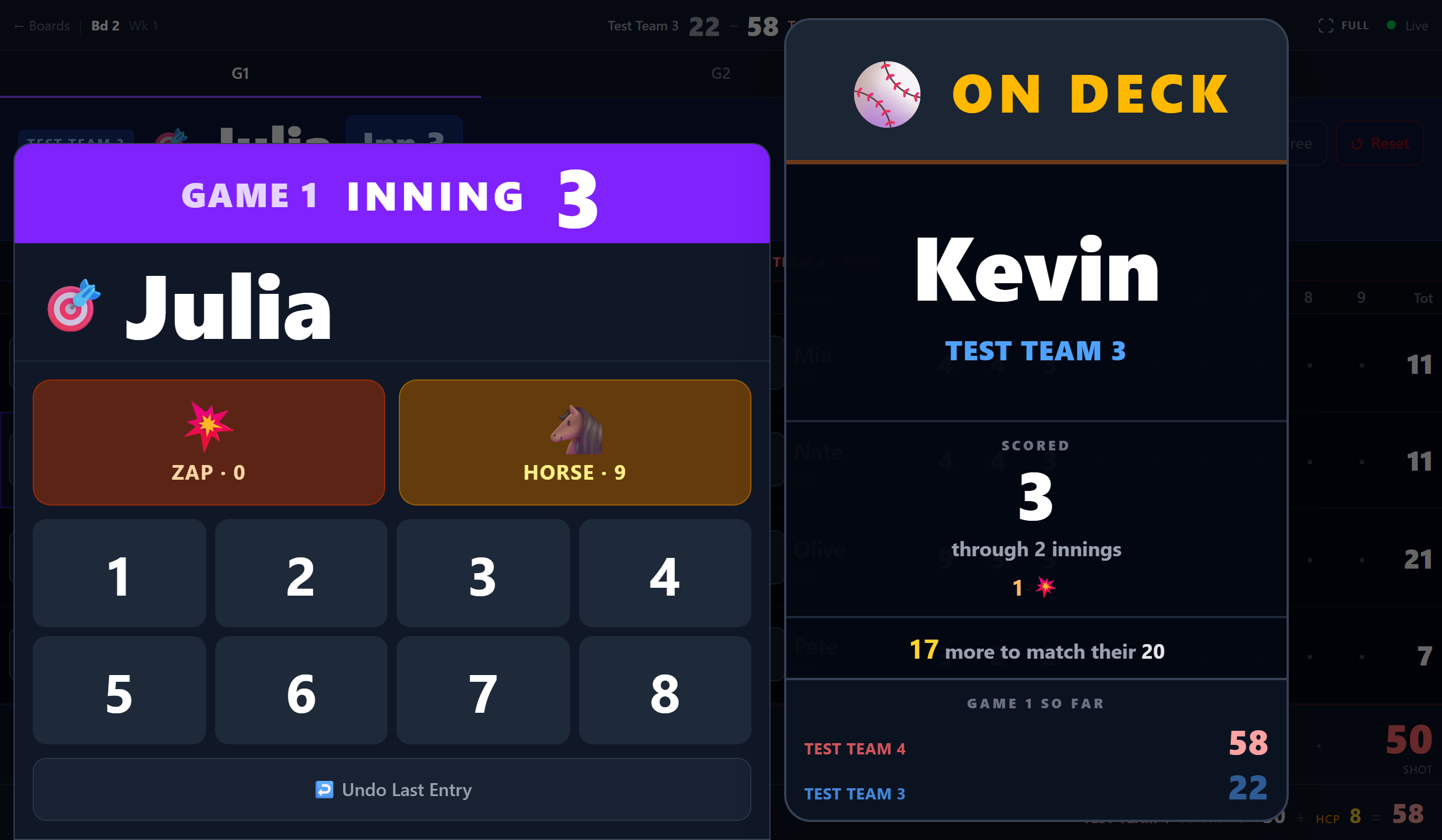
- 2Tap any empty cell to open the score numpad. The game and inning run across the top of it in large type, with the shooter being scored underneath, marked 🎯.
- 3Tap 💥 ZAP for a 0, 🐴 HORSE for a 9, or a number 1–8. Each tap saves straight away — there is no separate confirm.
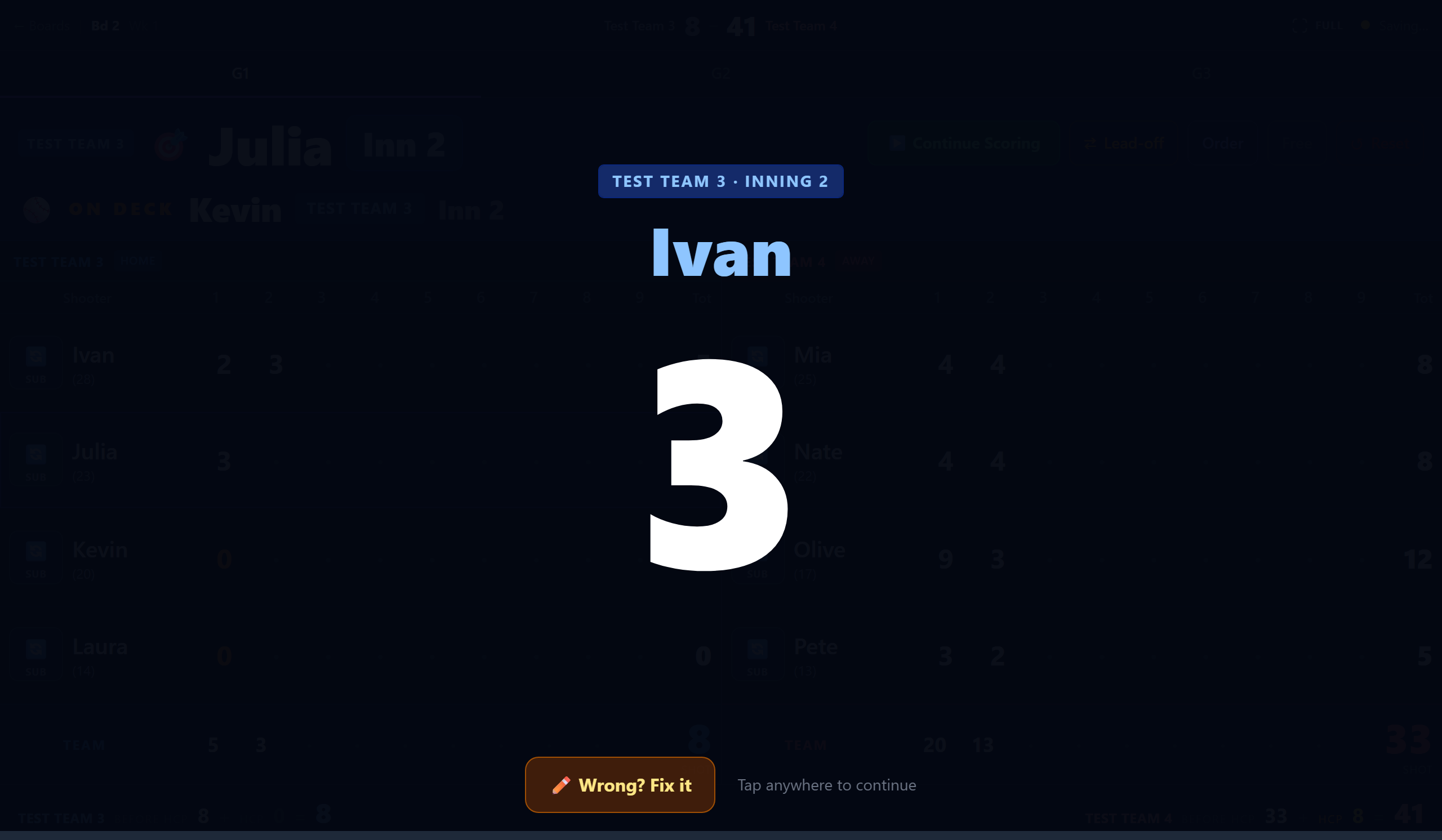
- 4In guided mode, the score you marked holds big on screen for a few seconds so the room can see it, then the next shooter's name, then the numpad reopens on their turn. Tap anywhere to move faster, or ✏️ Wrong? Fix it under the big number to re-enter it.
- 5Closed the numpad to check the board? Tap the shooter banner, or ▶ Continue Scoring, to reopen it on the right shooter.
- 6When every shooter on both teams has nine innings in, the game finishes on its own and the board moves to the review between games.
Good to know
A zap shows in orange. A · dot means the inning has not been entered yet.
Tip
Made a mistake? The numpad has ↩ Undo Last Entry, which takes back the most recent tap.
Who is up, and who is on deck#
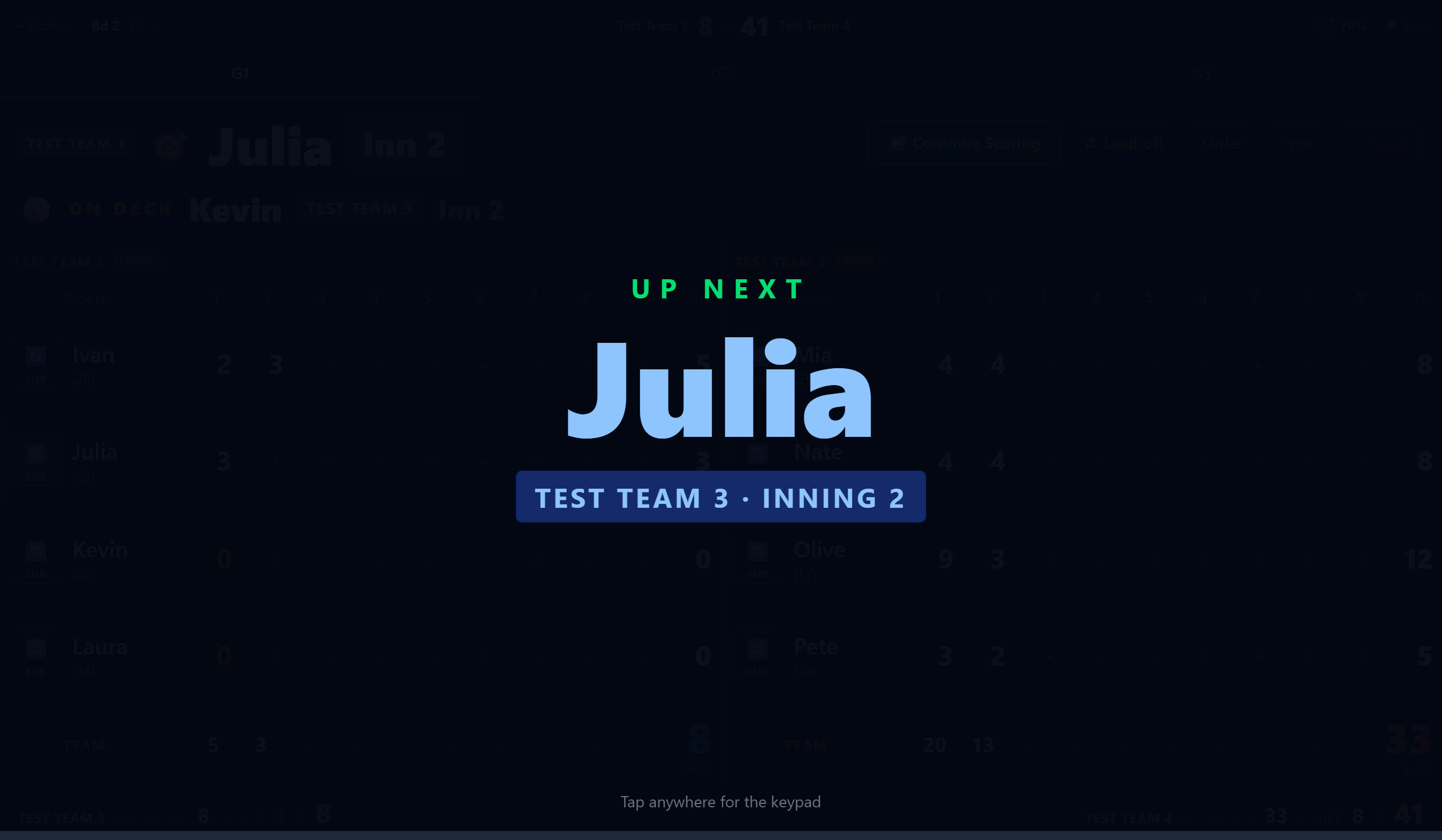 Open full size ↗
The bar across the top of the board names the shooter whose turn it is, with their team and the inning. Underneath it, ON DECK names whoever is next — big enough to read from across the room.
While the numpad is open it has an ON DECK panel of its own, because the numpad covers the bar behind it. Under the name it says what that shooter has thrown this game — Scored 22, through 4 innings, with their zaps and horses — and how that sits against their average: 12 more to match their 26, or Past their 26 by 4. At the bottom is the running score of the game.
Good to know
On a narrower tablet there is no room beside the keypad, so the panel sits above it with just the name and team. The keys always win the space.
Good to know
On deck is the next person who has not thrown yet, not simply the next name in the order — a cell filled in by hand does not call somebody who has already shot. On the last dart of a game it says so instead of naming anybody.
The two team totals#
There are two totals on the board and they are not the same number.
| Where | What it is |
|---|---|
| Top of the screen | The final: ghost contributions and handicap included. |
| Under each team's column, labelled shot | What that team has actually thrown. Ghosts left out. |
Good to know
When anybody is ghosted, the column spells out the difference underneath — for example + 28 ghost (80%) = 111 before handicap — so the two numbers reconcile without anybody working it out.
How a score gets saved#
Every score you tap goes to the league's server on its own, the moment you tap it. The server is the one copy of the match: standings, stats and the printed packet all read from it. When it answers “saved”, the light reads Live.
Swipe sideways for the whole drawing →
- No answer, or signed out? The score goes into a waiting line kept on the tablet itself. It is still there if the page reloads or the tablet closes the tab.
- The tablet keeps trying every thirty seconds, the moment wifi comes back, and right after somebody signs in. The waiting scores go through in order, and nothing has to be typed twice.
- Any other tablet can open the same board and pick up the lineup and every saved score, because the match lives on the server and not on the tablet.
Good to know
Scores still in a tablet's waiting line only send from that tablet. Before swapping a board to another tablet, get the first one back to Live so nothing is left behind on it.
The connection light#
- Green, “Live” — everything is saved
- Yellow pulse, “Saving” — a save is on its way
- Amber pulse, “Holding 2” — the tablet is holding that many scores the server has not taken yet
- Red pulse, “Offline” — no connection
- Grey — connecting
Tip
Keep scoring. A score that does not save is held on the tablet, survives the page reloading, and is sent again every thirty seconds until it lands.
Good to know
The light never says Live while anything is still held. If it reads Holding and will not clear, say so: everything on screen is right, but the database does not have it all yet.
If the tablet says it is signed out#
Scores only save for a scorekeeper or admin login on that league. If the tablet has lost its login, the next score brings up This tablet is signed out, and the header reads Signed out.
- 1Don't reload the page. The scores you entered are held on the tablet, and the sheet shows how many are waiting.
- 2Enter the tablet's email and password right on that sheet and tap Sign in & save. The waiting scores save and scoring carries on.
- 3No password handy? Tap Later to keep scoring. Every score is held, and a red bar across the top counts them. Tap the bar to sign in when you can.
Good to know
This login can't score this league means the account is signed in but is not a scorekeeper or admin here. Sign in on the sheet with one that is, or ask the league admin to add it.
The lineup follows the match, not the tablet#
Who is ghosted, who is subbing for whom and the shooting order are saved with the match itself. Open the same match on another tablet, after a reload, or from the home-screen icon, and the lineup that was actually being scored comes back with it.
It used to live only in the browser doing the scoring, so any change of browser started again from the roster without saying so — and on 1 October 2026 a sub who had shot 30 came back as a ghost worth 30.
Tip
The tablet keeps its own copy as well, so the board still works with the wifi down. Whichever was set most recently wins.
Good to know
Reset Match clears both. That is the point of it — otherwise the next tablet to open the match would bring back the lineup that had just been thrown away.
Good to know
A tablet picking up a match somebody else started will not score until it has the lineup. If it cannot reach the server it says so and keeps trying, rather than falling back to the roster. There is a way past it if the wifi is simply gone, and it says plainly that the subs will have to be set again.
If somebody is shooting who is not in the lineup#
An amber bar across the top names anybody who has scores in this game but is not in the lineup, and offers to open the lineup editor. It shows on the scoring screen and on the review between games.
That is what a lost sub looks like. If a tablet reloads and the sub does not come back with it, the rest of the game would go to the wrong person — and on week 1 of Fall 2026 that went unnoticed for three or four innings.
Good to know
Between games the figures under each team say it too: a sub whose points are in the final but whose name is missing from the box score shows as not shown, in amber.
Tip
Set the sub again and the bar goes. If the swap was deliberate, I know dismisses it for that game.